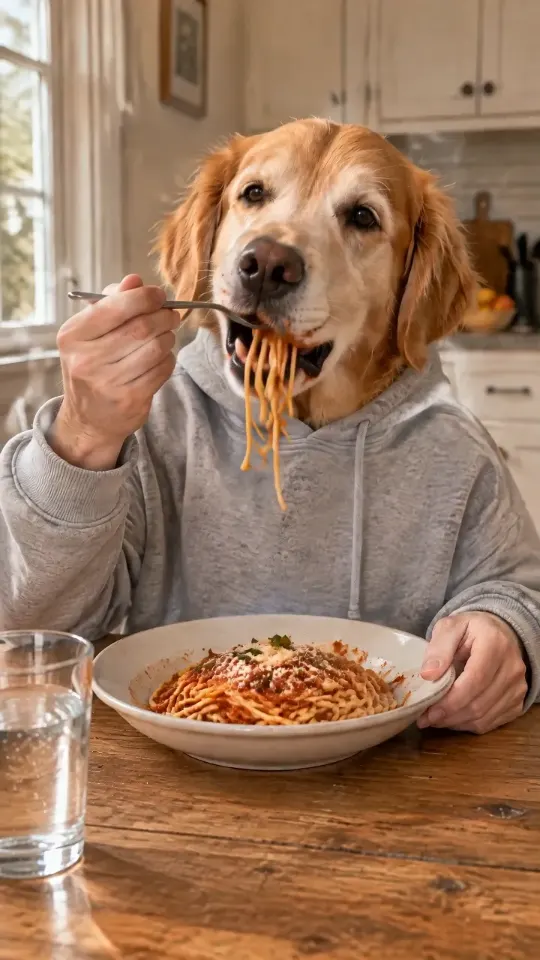
Dog eating spaghetti or a burger with human hands
Spaghetti night opens on a fork twirl and a long slurp, pauses while your dog savors the bite, reaches for a glass of water, takes a sip and ends on a satisfied thumbs up. Burger business starts with a big two-handed bite, moves on to a few fries and a soda break, and finishes with a pat on a very full belly. Both scenes run for 15 seconds and use the same single pet photo, so you can try one and come back for the other.
What you see before you pay
After you add a photo, the studio makes two watermarked still images of your pet in the chosen scene. Review the hands, food, expression, likeness and clothing yourself before choosing. No extra visual model delays the previews. Pick the one you like and its clean, unwatermarked original becomes the exact first frame of the video. The previews are free and do not require an account.
How the human hands are added
Your pet wears one complete hoodie, and two adult human hands come out of its own sleeves. Only the head shows above the collar, so the hands always look attached to your pet rather than reaching in from the edge of the frame. The arms, table, food and movement are generated together with the face; nothing is pasted on top. This is a fictional scene, not a recording of a real pet eating human food. Please do not recreate these meals with your animal.
The best photo for a dog with human hands video
Use one sharp photo with one pet. Include the full face, both ears and the upper chest, ideally in natural daylight and at eye level. The shorter side needs at least 300 pixels. Photos taken from far away, with sunglasses, costumes or heavy filters make markings harder to keep. If several animals are in the picture, crop to one before you continue. Choose the correct people or pet version yourself; photos are not automatically classified.
Cats eat with human hands too
A clear cat portrait works in both dinner scenes. The example library includes a real cat spaghetti video made on this site, so you can see how whiskers, ear shape and coat pattern come through. As with dogs, likeness, fingers and motion can vary from one generation to the next, so watch the result before you share it.
From photo to private MP4
When you are happy with the first frame, press Generate video. Sign in with Google or email so the result is saved to your account, choose a one-time pack if you do not have a video left, and let the scene render. It usually takes 5–20 minutes; you can close the tab and come back from My videos. The finished file is a 15-second, 720p, 9:16 MP4 with food sounds and room tone, no music and no speech, kept privately for 24 hours after delivery.